Upgrade Microsoft Dynamics GP 2016 to Dynamics GP 18.9 (GP 2027)
Microsoft Dynamics GP 2016 R2 Upgrade. Trust The Professionals.
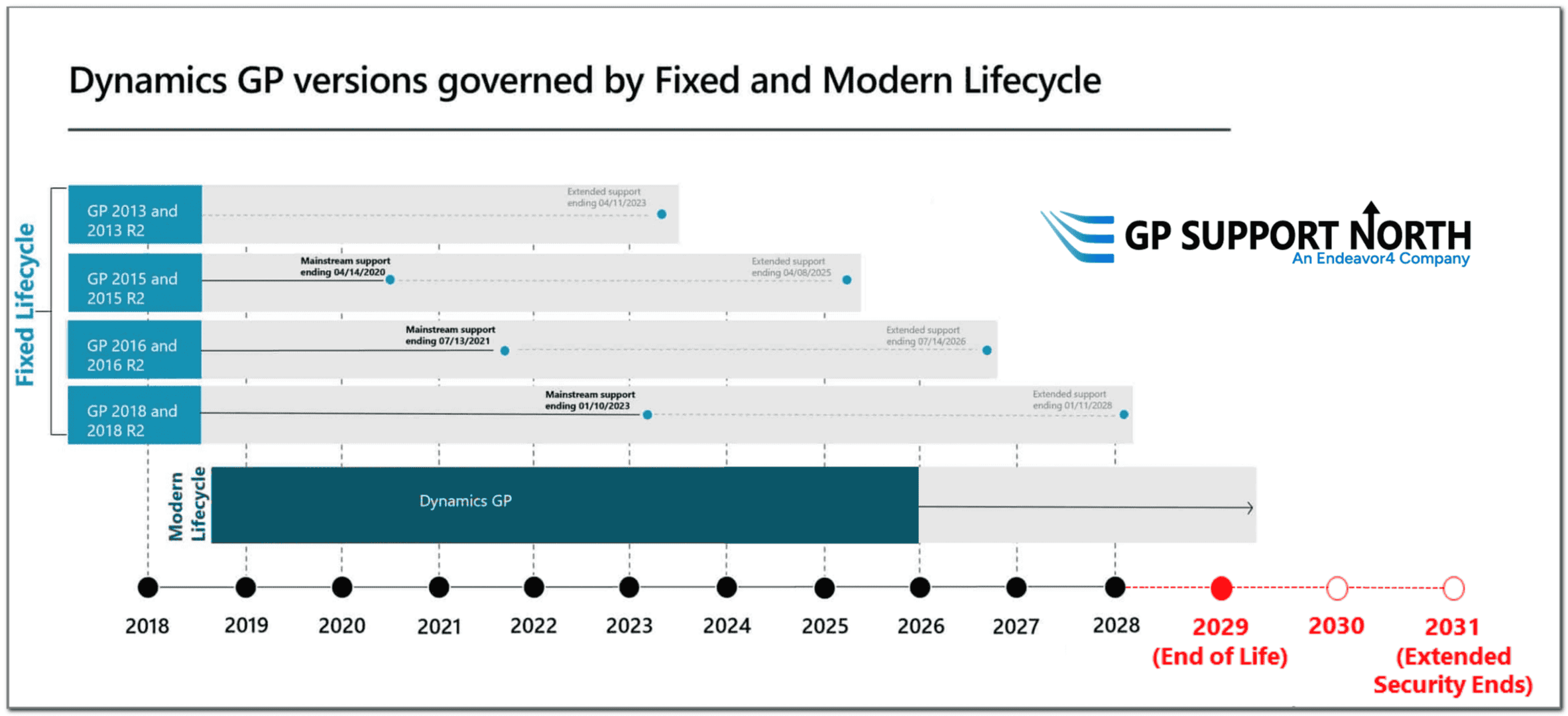
If you're still running Microsoft Dynamics GP 2016 or GP 2016 R2 (Version 16.x), now is an important time to consider upgrading. Microsoft mainstream support for GP 2016 ended in July 2021, and extended support ended in July 2026.
Our team at GP Support North has been supporting Microsoft Dynamics GP (Great Plains) for over 35+ years. Over that time we have performed over 1,000 upgrades and implementations of ERP, CRM and Cloud applications.
Updating From a Different Fixed Lifecycle? Check Out Our Other Update Support Pages:
What's New GP 18.9 Guide.pdf
 (opens in a new tab)
What You Need To Know:
Your GP 2016 environment is now outside Microsoft support: Microsoft Dynamics GP 2016 was released in May 2016. Mainstream support ended in July 2021, followed by the end of extended support in July 2026. That makes upgrading important for organizations that want to remain on Dynamics GP while moving to a more current, supported technology stack.
Moving from GP 2016 to GP 18.9 requires a multi-step upgrade: There is not a direct Microsoft-supported upgrade path from GP 2016 to GP 18.9. Microsoft's current guidance lists Dynamics GP 18.7.1756 or later as the supported starting point for an upgrade to GP 18.9. As a result, a GP 2016 environment will need to move through one or more intermediate versions before reaching GP 18.9. The exact upgrade path depends on your current GP 2016 build. An upgrade project should therefore begin by reviewing your current GP version, SQL Server environment, integrations, customizations and related infrastructure.
Your GP 2016 version was released in May 2016 and ended Microsoft mainstream support in July 2022 - Microsoft is no longer releasing service packs and updates such as payroll taxes for GP 2016.
Your SQL Server environment may also need to be upgraded: GP 2016 supported SQL Server 2012, SQL Server 2014 and SQL Server 2016. The current GP 18.9 release supports SQL Server 2019, SQL Server 2022 and SQL Server 2025. That means organizations moving from GP 2016 to GP 18.9 may need to modernize their SQL Server environment as part of the overall upgrade project. Rather than treating the GP application upgrade in isolation, this is a good opportunity to examine the complete technology stack supporting your ERP environment.
Don't forget about VBA and legacy customizations: If your GP environment relies on older VBA customizations, those components also need to be evaluated during upgrade planning. Microsoft specifically notes that Visual Basic for Applications (VBA) is not supported on Windows Server 2019. Older customizations and integrations should therefore be reviewed to determine whether they can be replaced with current Dynamics GP functionality, updated integrations, ISV solutions or other supported approaches.
Your version of Dynamics GP 2016 R2 is a few versions behind and may need to follow a multi-step upgrade path. This involves 1 or 2 upgrade 'hops' to intermediate versions before moving to the latest version of Microsoft Dynamics 18.7.xx (aka GP 2025). This process would include test upgrades and validation along the way before upgrading your production environment.
Review Management Reporter and your reporting strategy: If your organization uses Management Reporter, your reporting environment should be reviewed as part of the upgrade process as well. An upgrade can also provide an opportunity to evaluate complementary reporting and analytics tools such as Microsoft Power BI, particularly where organizations want to expand their reporting and data visualization capabilities.
Some of your past customizations and integrations may need to be replaced with current out-of-the-box functions or with other ISV add-ons or customizations. As noted above VBA is no longer supported.
Upgrade to Dynamics GP 18.9
If you plan to continue using Dynamics GP, upgrading from GP 2016 to Dynamics GP 18.9 provides an opportunity to move away from aging GP and SQL Server components while bringing your ERP environment onto a much more current Dynamics GP release.
It's also worth looking beyond the immediate upgrade. Microsoft has announced that product enhancements, regulatory and tax updates, and technical support for Dynamics GP will end December 31, 2029, with security updates, if needed, available through April 30, 2031.
For many GP customers, that makes the conversation less about“Do we need to leave GP immediately?” and more about how to keep GP healthy and current while developing a longer-term ERP roadmap.
With GP Support North you can Expect your GP upgrade to include:
- A proper assessment of your needs
- A scope and project plan to meet your objectives
- A technical upgrade including pre-production and live production upgrade
- Advisory Services to review opportunities for improvement including configuration, training and adoption of new functions.
Additional considerations for your Microsoft Dynamics GP 2016 R2 upgrade to GP 18.9.xx
Given the age of your current ERP, we presume that there may have been factors that held back earlier upgrades. A focus on increased productivity as well as end-user training should be top of mind.
Additional strategic plans for the adoption of new features, functions and add-on applications is highly recommended:
- Approvals workflow via email for Purchase Requisitions, and Payables
- GP Security enhancements
- Enhanced BI, reporting, and budgeting processes
- Improved billing and revenue recognition
- Expense management
- AP automation
- PO automation
- eCommerce and vendor portals
- Cloud integrations
- Private Cloud Hosting (includes SQL Server, Windows Server and Remote Desktop access)