Upgrade Microsoft Dynamics GP 2015 to Dynamics GP 18.9 (GP 2027)
Microsoft Dynamics GP 2015 R2 Upgrade. Trust The Professionals.
If your organization is still running Microsoft Dynamics GP 2015 or GP 2015 R2 (Version 14.x), your ERP is now outside Microsoft's support lifecycle.
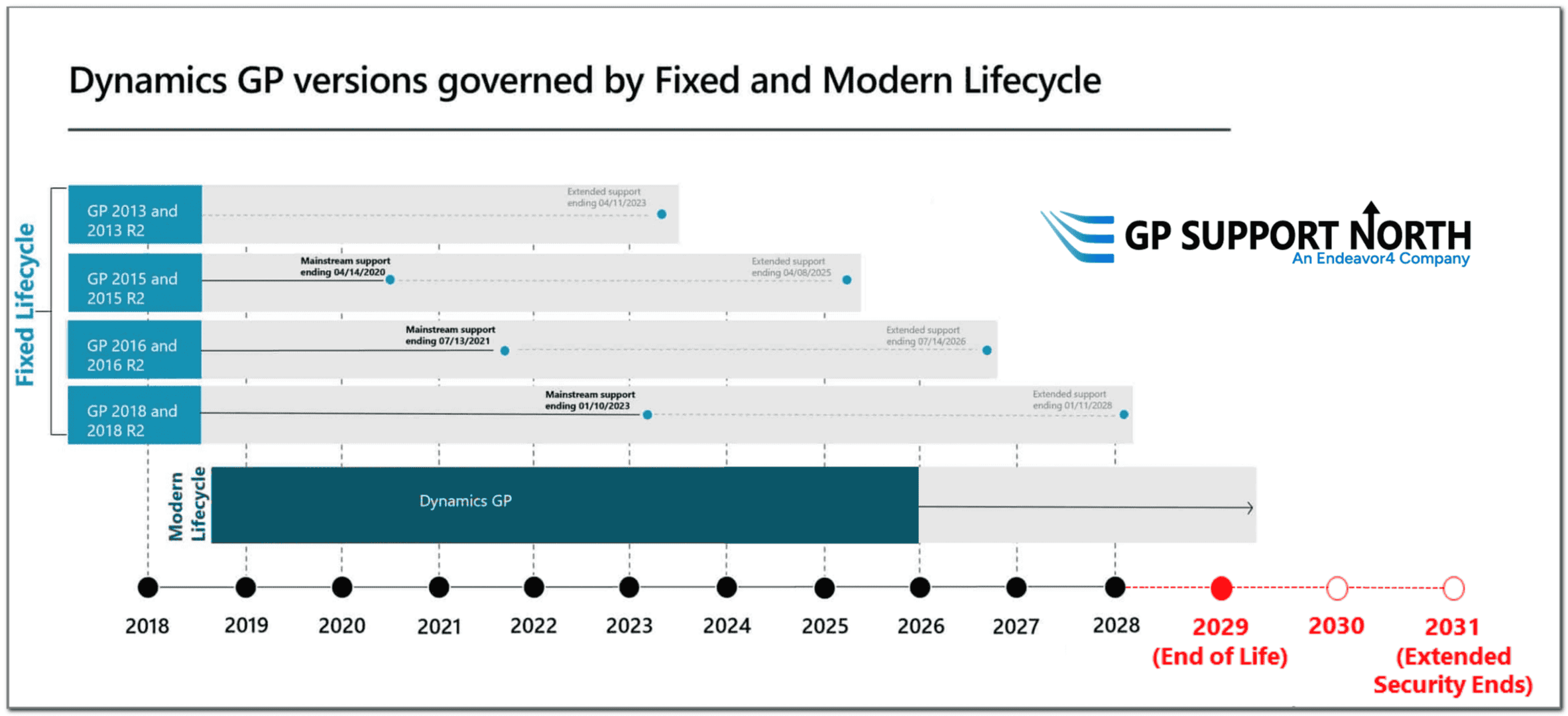
Microsoft mainstream support for GP 2015 and GP 2015 R2 ended in April 2020, followed by the end of extended support in April 2025.
GP Support North can continue supporting your Dynamics GP environment and help you develop a plan to move from GP 2015 to the latest Microsoft Dynamics GP 18.9 (October 2026 Release).
Updating From a Different Fixed Lifecycle? Check Out Our Other Update Support Pages:
What's New GP 18.9 Guide.pdf
 (opens in a new tab)
What GP 2015 Users Need To Know:
Your GP 2015 environment is no longer supported by Microsoft: Microsoft Dynamics GP 2015 was originally released in February 2015. Microsoft mainstream support ended on April 15, 2020, and extended support ended on April 9, 2025. GP 2015 R2 has reached the same support end dates. If you're continuing to run GP 2015, now is a good time to evaluate both the application and the underlying technology supporting your ERP system.
Upgrading GP 2015 to GP 18.9 is a multi-stage process: Moving from GP 2015 to GP 18.9 is not a direct upgrade. Microsoft's current upgrade guidance identifies Dynamics GP 18.7.1756 or later as the supported starting point for an upgrade to GP 18.9. For a GP 2015 environment, that means the upgrade needs to move through supported intermediate versions before reaching GP 18.9. The specific path will depend on your existing GP build and environment. This makes proper upgrade planning especially important. Microsoft also recommends incorporating a test upgrade and validating third-party products, customizations, modified reports and integrations before moving into production.
Your SQL Server environment will likely need attention too: Dynamics GP 2015 supported SQL Server 2012 and SQL Server 2014. GP 18.9 supports SQL Server 2019, SQL Server 2022 and SQL Server 2025. For many longtime GP 2015 environments, upgrading Dynamics GP therefore involves more than updating the GP application itself. The underlying SQL infrastructure needs to be considered as part of the upgrade plan.
Review VBA, customizations and integrations: A GP environment that has been running since the GP 2015 era may include customizations, integrations or other components that need to be evaluated as part of the upgrade. This is particularly important for environments that use Visual Basic for Applications (VBA).
Microsoft's Dynamics GP upgrade guidance states that VBA is not supported on Windows Server 2019. Microsoft also specifically recommends testing third-party products, customizations, modified reports and integrations such as eConnect and Integration Manager during a GP 18.9 upgrade. Some older functionality may therefore need to be updated or replaced with current Dynamics GP capabilities, supported ISV solutions or new integrations.
Review your reporting and analytics strategy: Your GP upgrade is also an opportunity to review the reporting and analytics tools surrounding your ERP environment. For organizations looking for more modern analytics and visualization capabilities, technologies such as Microsoft Power BI can be considered alongside the continued use of Dynamics GP.
What To Expect From Your GP 2015 Upgrade
With GP Support North, your Dynamics GP upgrade can include:
- An assessment of your existing Dynamics GP environment
- Review of your current GP build and supported upgrade path
- Review of SQL Server and infrastructure requirements
- An upgrade scope and project plan
- Pre-production/test upgrades
- Validation of integrations, customizations and third-party solutions
- Production upgrade planning
- Review of opportunities to improve configuration, reporting and user adoption
Testing should be a central part of the project. Microsoft specifically recommends testing databases, third-party products, customizations, modified reports and integrations as part of the GP 18.9 upgrade process.
Consider Your Longer-Term Dynamics GP Roadmap
Moving from GP 2015 to GP 18.9 doesn't necessarily mean you need to immediately replace Dynamics GP. But because of the age of a GP 2015 environment, an upgrade is a good opportunity to think about what comes next.
Microsoft has announced that Dynamics GP product support and updates will end December 31, 2029, with security patches ending April 30, 2031. That gives GP customers an important planning window.
For some organizations, the right strategy may be to upgrade to GP 18.9 and continue using GP while developing a longer-term ERP roadmap. Others may decide it makes sense to evaluate a future transition to Microsoft Dynamics 365 Business Central.
Either way, the important first step is understanding the condition of your current GP 2015 environment and creating a roadmap that fits your business.